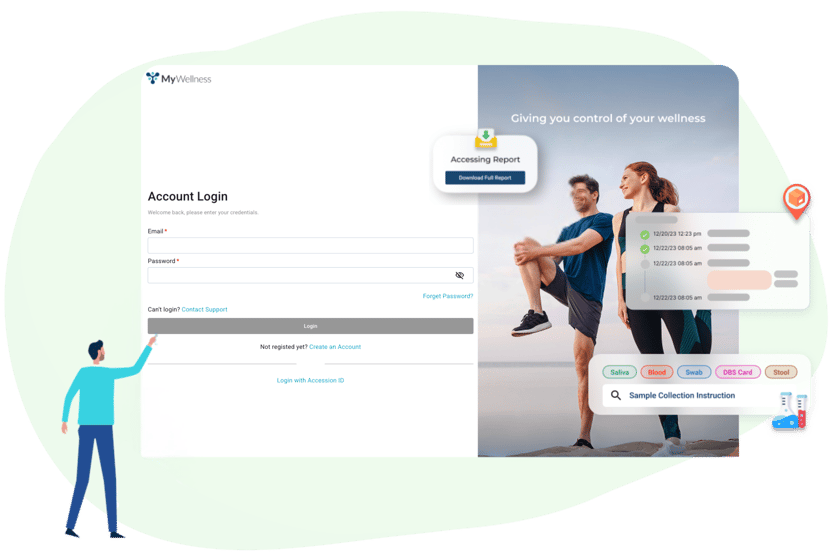
Patients can now create an account using their email and password, eliminating the need to look up an accession ID each time they log in.
Patient accounts make it easier than ever for patients to manage their Vibrant testing experience from start to finish. With a secure MyWellness login, patients can view all current and future orders, access collection instructions, track kits, and review shared results with ease. This update simplifies access, enhances security, and helps patients stay connected to their health.
Simplifies Access
With a one-time setup, patients can log in anytime, even if they can no longer locate their accession ID or have already returned their kit. This update simplifies future and repeat orders by giving patients an active account where they can easily access their information, understand the testing process, and manage their test results all in one place. For your practice, this creates a smoother path to encourage repeat and additional lab orders since patients have a simple and familiar way to stay connected to their results.
Enhances Security
This update enhances security by replacing guest access with verified email logins and password protection. The built-in “Forgot Password” feature allows patients to safely reset their credentials at any time, ensuring only authorized users can access personal health information while maintaining a simple, familiar login experience.
Supports Long-Term Engagement
This update provides a simple and reliable login process that makes it easier for patients to access MyWellness and stay connected to their results. With their own secure login, patients always know where to find their information and what to expect from future testing. New orders appear automatically in their account, eliminating the need to enter accession IDs manually and making it easier for patients to stay consistently engaged with their health information.
For more information on how to set up a Patient Account, check out this Help Article.