
Sample Timeline: All Sample Updates In One Simple View

Graphics Workspace - 2025-12-12T134214.332
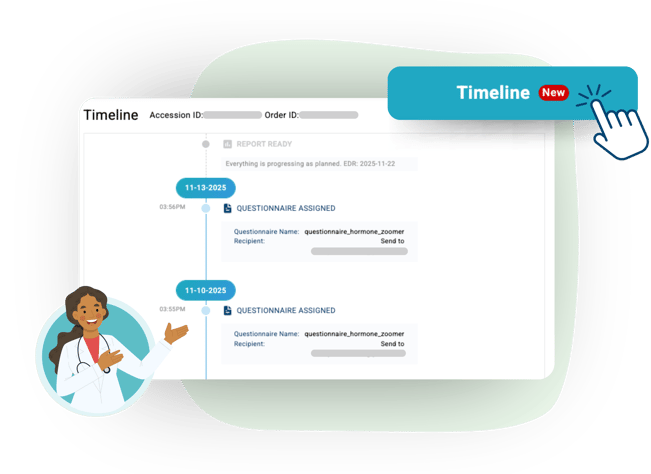
The Sample Timeline gives providers a real-time, step-by-step view of each order. All updates and patient notifications appear in one place for fast tracking and follow-through.
 
One Timeline. Every Update.
See the current status, what’s next, and where action is needed. Quickly resend patient notifications or questionnaires so nothing gets overlooked.
 
It’s a simpler, more confident way to manage orders and keep the whole team aligned.


What’s New

Chronological Event View: A complete, ordered list of events from order creation to report delivery, allowing you to track progress step by step without switching pages.
 
Detailed Event Cards: Each event includes essential details such as timestamps, shipping updates, report status, questionnaires, and payment information, making sample progress easier to understand at a glance.
 
Real-Time Tracking: Events update instantly as they occur, providing a real-time view of each order.
 
Future Events: Clear visibility into upcoming steps so your practice can prepare for patient follow-ups more efficiently.
 
Resend Patient Notifications:
Quickly resend missed or unopened notifications and questionnaires directly from the timeline so nothing slips through.
 
The Sample Timeline helps practices stay organized, responsive, and confident in every step of the patient journey.
 
To learn more, check out this Help Article.
Image of Brian Saunier

Brian Saunier

Related Articles

Redraws, Rebuilt: Smarter, Simpler, Split

Despite our best efforts and yours, sometimes, the need for a redraw can't be avoided, whether it's due to insufficient sample volume, contamination, patient er...

Save Time and Improve Care with Automatic Advanced Redraw

Despite our best efforts and yours, sometimes, the need for a redraw can't be avoided, whether it's due to insufficient sample volume, contamination, patient er...

Graphic promoting easy meeting scheduling with a Vibrant Wellness representative. A dashboard interface shows a scheduling menu with options like 'Schedule a Clinical Consult' and 'Schedule a Meeting with Sales,' alongside an illustrated professional holding a clipboard and text that reads ‘Schedule a Meeting with Your Vibrant Rep in Seconds.’
Schedule a Meeting with Your Vibrant Rep in Seconds

We understand that schedules are tight, and going back and forth via email can slow things down. That’s why the Vibrant Provider Portal now includes a faster wa...